
Trenly Rental Services
Do the job. Send the report.
Trenly Rental Services is an iPhone app for vendors who work at rental homes: maintenance and repair pros, showing agents, inspectors and turnover crews. Every visit ends with a clear, dated report with photos, under your business name.
Jobs from landlords on Trenly are free.
For iPhone · United States only
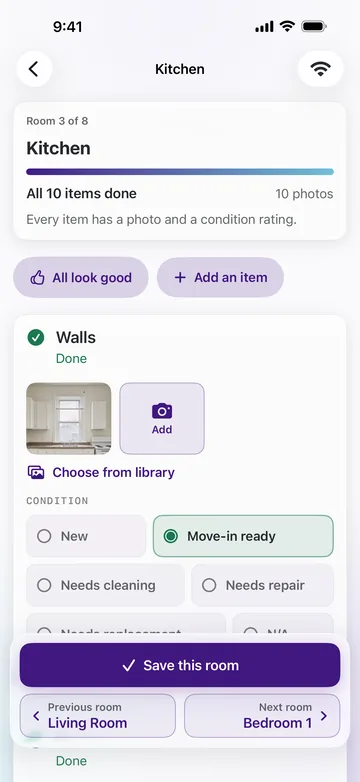
The work you do at a rental, in one app
Room by room, with photos as you go. Every job ends with a report under your business name.
Showings
Meet prospective residents at the home, then tell the landlord how it went: who came, how interested they were, and what they thought of the rent.
Walk-throughs
Inside, outside or both: problems found, equipment with model numbers and filter sizes, and smoke and CO detectors.
Condition reports
Move-in and move-out: every room rated and photographed, and dated, for the owner's records.
Repair visits
Before and after photos, what you did and the parts you used. Say it out loud instead of typing, if that's easier.
Keep working without signal
Once a visit is started, photos and notes stay on your phone in basements and crawl spaces, and send when you're back in range.
Jobs from landlords on Trenly
A link, a code, and the job is ready to start
Landlords who run their rentals on Trenly, on the web or in the Trenly owner app, send on-site jobs to their vendors: showings, walk-throughs, move-in and move-out condition reports, and repair visits.
-
1
You get a link and a code
By email or text. Your first job needs no sign-up.
-
2
Open it in the app or your browser
The same link opens the job in Trenly Rental Services, or in your phone's browser if you don't have the app.
-
3
The way in, when you need it
When the landlord adds how to get in, it's on the job: a lockbox, a gate code, a key, or who's meeting you. Codes show an hour before the visit.
-
4
Your report goes straight back
The landlord gets it in Trenly, filed under that home.
Jobs a landlord sends you through Trenly never cost you anything.
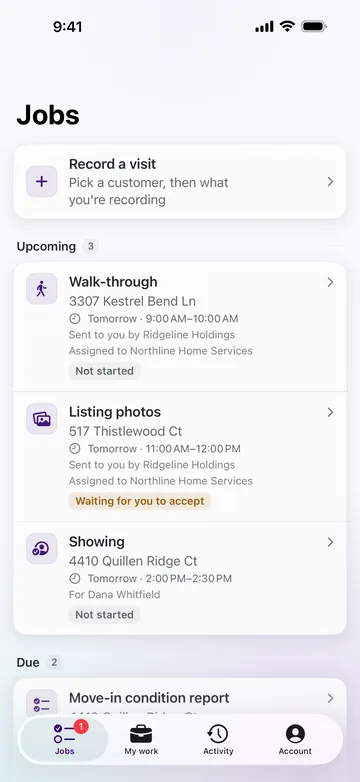
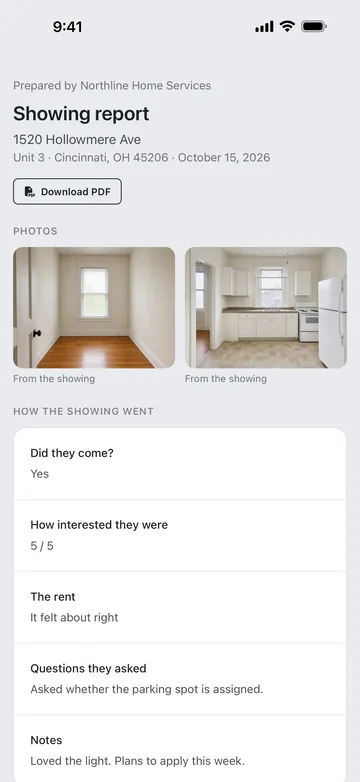
Your own customers
A better experience for the customers you already have
Use the same app for the landlords and owners you already work for. Add a customer and their home, do the visit, and send them a professional report: what you found, what you did, with photos.
- It comes from your business, under the name you type.
- They open it from a link in a minute, with no account to create.
- They can download it as a PDF for their records.
- You sign in with your email or mobile number and a one-time code. There's no password.
Reports for your own customers use credits. See what each one uses
Credits, only for your own customers
Jobs from landlords on Trenly never use credits. Reports you send to customers you added yourself do, and you start with 8 free credits.
| What you send | Credits |
|---|---|
| Walk-through | 1 |
| Repair visit | 1 |
| Showing | 1 |
| Condition report Move-in or move-out | 4 |
- Credits are used only when you send a report, never for a visit you don't finish.
- Sending a report again to the same person is free. Sending it to someone new is a new send.
Adding credits
- 20 credits $4.99
- 100 credits $19.99
Buy them in the app, through the App Store, when you run low. Credit has no cash value and isn't refundable.
For landlords
Reports from the people who work at your rentals
You run your rentals on Trenly
Send a showing, a walk-through, a condition report or a repair visit to your own vendor from Trenly, on the web or in the owner app. They get a link and a code, with nothing to install or sign up for, and the job is free for them.
The report comes back to you in Trenly, filed under that home.
Your vendor sent you a report
It's a report your vendor made at your rental: what they found or did, with dated photos. It comes from their business, and Trenly Rental Services is the app they made it with.
Open it from the link you were sent and confirm it's you with a one-time code. There's no account to create, and you can download it as a PDF. Questions about the work go to your vendor.
Own rentals yourself? Trenly is property and asset management, automated. See how it works
Common questions
What is Trenly Rental Services?
Trenly Rental Services is an iPhone app for vendors who work at rental homes: maintenance and repair pros, showing agents, inspectors and turnover crews. Every visit ends with a clear, dated report with photos, under your business name. Landlords on Trenly send jobs to it, and you can use it for your own customers too.
Who is it for?
Anyone who works at rental homes for landlords and owners: handymen and repair pros, plumbers, electricians and HVAC techs, showing agents, inspectors, and crews who turn a home over between residents.
Is it free?
The app is free to download, and jobs from landlords on Trenly are free. Reports you send to your own customers use credits, and you start with 8 free credits. A walk-through, a repair visit or a showing uses 1, and a condition report uses 4. Credits are used only when you send a report.
Do I need an account?
Not for a job a landlord sends you: the link and code open it, with no sign-up. To use the app for your own customers, sign in with your email or mobile number and a one-time code, then type your business's name. There is no password.
What are a job link and a code?
When a landlord on Trenly sends you a job, you get an email or a text with a link and a short code. Open the link and enter the code, and the job opens: in the app if you have it, or in your phone's browser if you don't.
What does my customer receive?
A clear, dated report with photos, from your business: what you found and what you did. They open it from a link and confirm it's them with a one-time code. There is no account to create, and they can download the report as a PDF.
Does it work without signal?
Yes, once a visit is started. Photos and notes stay on your phone in basements and crawl spaces, and send when you're back in range. Starting a visit needs a connection.
Is there an Android app?
No. Trenly Rental Services is for iPhone. A job a landlord on Trenly sends you also works in any phone's browser, from the same link and code.
Is Trenly Rental Services available outside the US?
No. It's available in the United States only.
How do I get more credits?
In the app, through the App Store: 20 credits for $4.99 or 100 credits for $19.99. Credits are used only when you send a report to one of your own customers. Sending it again to the same person is free.
I'm a landlord. What is a report from Trenly Rental Services?
A report your vendor made at your rental: what they found or did, with dated photos. It comes from your vendor's business, and Trenly Rental Services is the app they made it with. Open it from the link you were sent. You don't need an account. Questions about the work go to your vendor.
How do I delete my account?
In the app, open Account and tap Delete my account. It's immediate and permanent: your sign-in details are removed, reports you already sent stay with the customers you sent them to, and unused credit isn't refunded. You can also email support@trenly.com from the email or mobile number you sign in with, and we'll close it for you.
How do I get help?
Email support@trenly.com. Tell us the email or mobile number you sign in with, and which job it's about.
Support
Get help with Trenly Rental Services
A job link that won't open, a code that didn't arrive, a question about credits or your account: email us. Tell us the email or mobile number you sign in with, and which job it's about.
support@trenly.comTerms for vendors
The part of Trenly's terms for your business's use of the app.
Privacy policy
How Trenly handles your information.
Deleting your account
From the app's Account screen, or email us. Reports you sent stay with your customers.
Trenly Rental Services is for iPhone, in the United States only.